Design your show jumping courses with real equipment.

Design your show jumping courses with the obstacles actually available. Strides calculate themselves, stock updates in real time, PDF exports in one click. You focus on the technique.

No credit card required
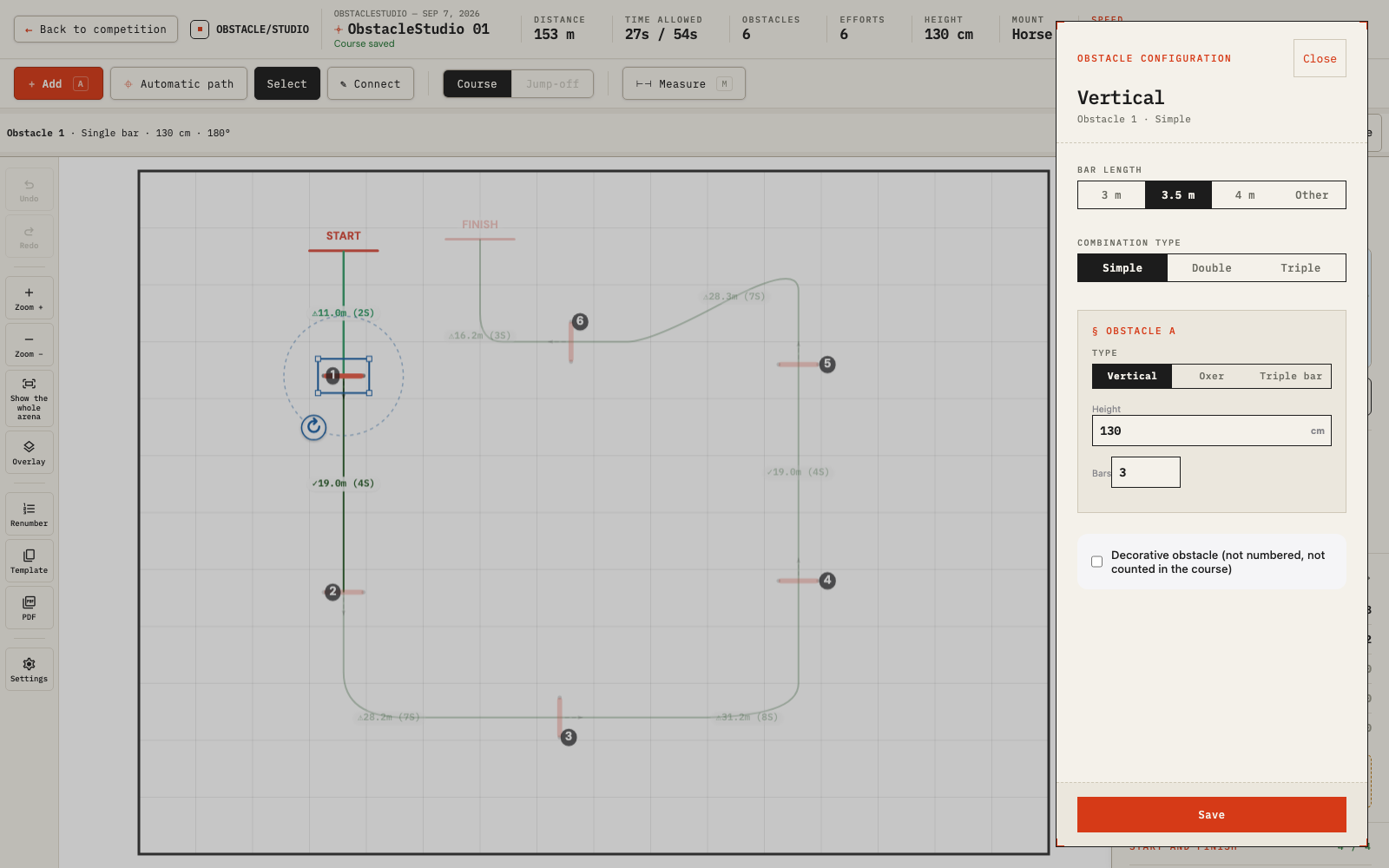
Show jumping course editor overview in ObstacleStudio

A course designer's reality

You arrive on competition morning. Your plan is ready. The equipment isn't.

Two back standards are missing. There aren't enough poles to build the triple. The fill you planned doesn't exist in the park. You lose time adapting your plan instead of perfecting it.

What's on your plan should be buildable as-is. No surprises.

How it works

Three steps. Zero improvisation.

1

Set up your competition

Enter your arenas and the obstacle park provided by the organizer. Equipment is shared across all classes.

2

Design your courses

Place obstacles using real equipment. Strides, distances and time are calculated in real time. Stock updates automatically.

3

Export your plan

Generate a high-resolution PDF with all technical details: numbers, distances, strides, class information. Ready for printing and briefing.

Key Features

Everything you need to arrive confident on competition morning.

edit_note

Place 12 obstacles in minutes

Verticals, oxers, triple bars, double and triple combinations: drag, rotate, adjust. The interface is built for speed without sacrificing precision.

calculate

Strides calculate themselves

Draw the track, distances and stride counts appear instantly. Speed, category, mount type — everything is factored in. Base time too.

picture_as_pdf

A print-ready plan in one click

Export high-resolution PDFs with obstacle numbers, distances, strides and class information. The plan you print is the one the crew builds.

qr_code_2

Share your courses with riders

Publish your courses during the competition: riders can access them from the Live Competitions page or by scanning the QR code on the printed plan. Interactive and zoomable on phone, no sign-up, no app to download. You choose when to publish and what to show.

Design with real equipment

Import the organizer's obstacle park and design each class with actually available equipment: pole sets, standards, fills, decorations, sponsor jumps. Stock is tracked in real time across all classes. No more improvisation on competition day.

Professional show jumping course

Built by course designers, for course designers.

Every feature was born from a real situation on the ground. Strides that change based on the mount, combinations that require precise spacing, equipment that runs out at the last minute. We know these problems because we've lived them.

  • check_circle Complete FEI obstacle library
  • check_circle Multi-arena management & custom dimensions
  • check_circle Built-in time allowed calculator
Obstacle configuration panel with obstacle park in ObstacleStudio — selecting poles, standards and fills
new_releases New

Design with real equipment, not imaginary obstacles.

The organizer provides an obstacle park. ObstacleStudio turns it into a live inventory. Every pole, every standard, every fill you place is deducted from stock. If something runs out, you know before competition day — not during.

  • check_circle Poles, standards, fills, decorations, sponsor jumps
  • check_circle Stock shared across all classes in the competition
  • check_circle Real-time alerts when stock is low or depleted
Try for free arrow_forward
Obstacle overlay from multiple classes in ObstacleStudio to optimize placement

10 classes this weekend. You're not starting from scratch each time.

Your arenas are reusable from one competition to the next: dimensions, background image, jury position, entrance, decorative elements. Copy a track from an existing class and adapt it. Overlay obstacles from other classes to optimize placement.

  • check_circle Reusable arenas with all their elements
  • check_circle Copy a track from any class
  • check_circle Overlay obstacles from other classes

Riders see your course on their phone.

Publish a class in one click. Riders access the interactive course by scanning the QR code on the printed plan or from the competition page. They can zoom, check distances and even walk the track in 3D. No sign-up, no app to download.

  • check_circle QR code embedded in the PDF plan
  • check_circle Interactive, zoomable course on phone
  • check_circle 3D Course Walk accessible to riders
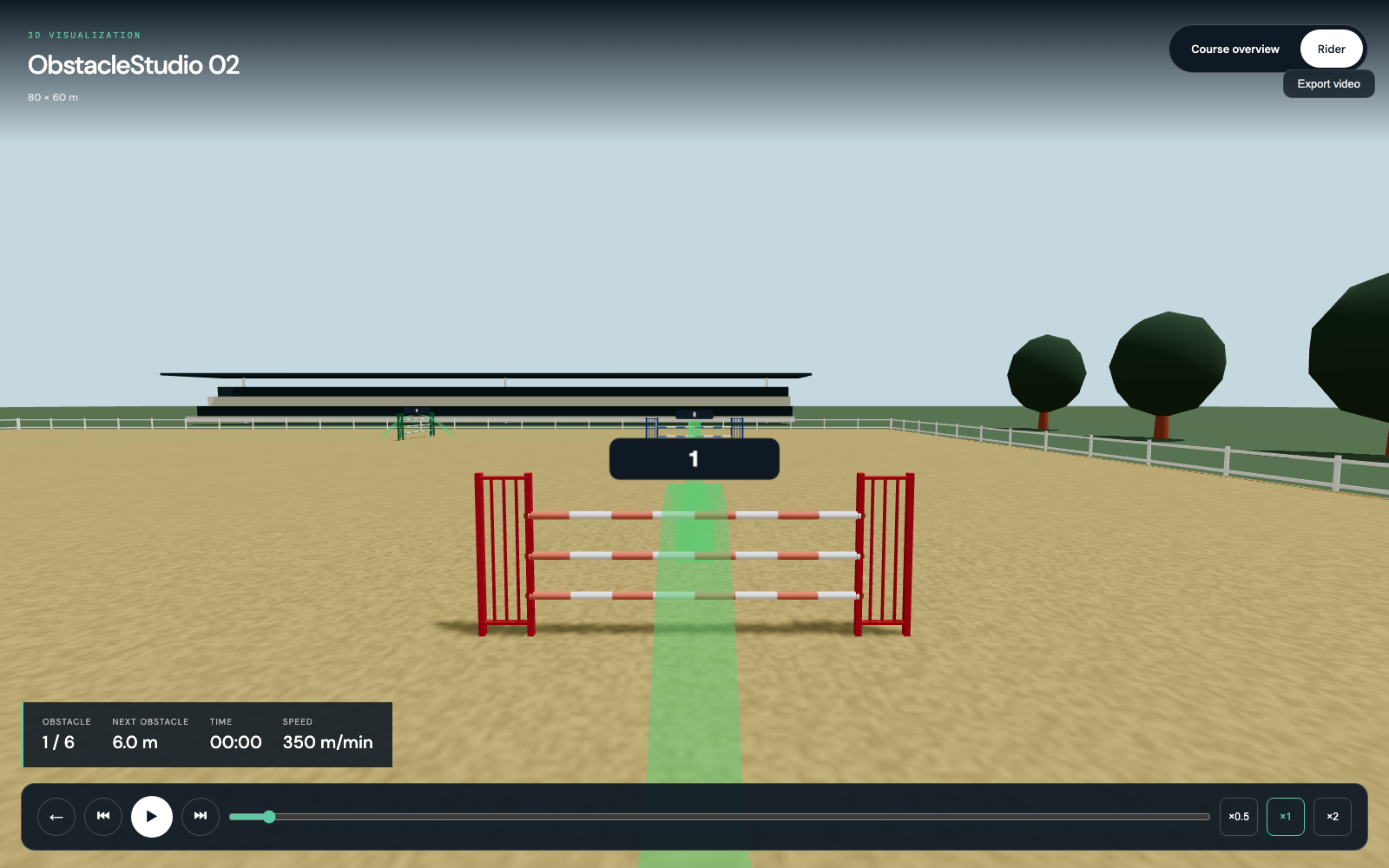
3D POV view of a show jumping course in Obstacle Studio
new_releases New

Experience the course in 3D, as if you were on the horse.

Ride through every obstacle in first-person view. The 3D Course Walk lets you visualize your course from the rider's perspective, with distances, curves and jumps in real time.

  • check_circle Immersive rider's point of view
  • check_circle Speed control, pause, obstacle-by-obstacle navigation
  • check_circle Accessible to riders via the sharing link
Try for free arrow_forward

Pricing

Simple and transparent.

Free

0€
  • check_circle Unlimited course creation
  • check_circle Automatic calculations
  • check_circle PDF export
  • cancel No cloud save
  • cancel No course export
Perfect to try

Weekly

15€
for 7 days
  • check_circle Everything in the free plan
  • check_circle Unlimited cloud storage
  • check_circle Reload your saved courses
  • check_circle Export/Import courses
  • check_circle Custom arenas
Most popular

Annual

149€
per year
Always up to date, all features included
  • check_circle Everything in the free plan
  • check_circle Unlimited cloud storage
  • check_circle Reload your saved courses
  • check_circle Export/Import courses
  • check_circle Custom arenas
  • check_circle Multi-device sync

verified Your saved courses are kept forever and remain viewable even with a free account.

FAQ

Frequently Asked Questions

What is ObstacleStudio?

expand_more

ObstacleStudio is an online show jumping course design software. It allows course designers and equestrian professionals to create, visualize and export course plans with automatic stride and distance calculations.

Is ObstacleStudio free?

expand_more

Yes, the free mode gives access to all design features: obstacle placement, stride calculations, PDF export. Only cloud saving requires a subscription: €15 for 7 days or €149 per year.

What is the obstacle park and how does it work?

expand_more

The obstacle park is the complete inventory of equipment provided by the competition organizer: pole sets (painted wood, PVC, aluminum), front and back standards, fill elements (hedges, walls, planks, gates), decorations and sponsor obstacles. By importing this park into ObstacleStudio, you design your courses with real equipment. Stock is tracked in real time across all classes — you know exactly what's available, what's in use, and what's depleted, before you even arrive at the venue.

How does the automatic stride calculation work?

expand_more

The algorithm instantly calculates the number of strides between each obstacle based on the competition speed, category (national, international) and standard canter length. You can adjust parameters according to the competition level.

Can I use ObstacleStudio on a tablet at the showground?

expand_more

Yes, ObstacleStudio works on any web browser: computer, tablet and smartphone. The interface is optimised for touch input, making it ideal for use directly at the venue when preparing a competition.

What export formats are available?

expand_more

You can export your courses as high-resolution PDF for printing and JSON for saving and sharing. PDFs include obstacle numbers, distances and all technical information needed for competition day.

Who is ObstacleStudio designed for?

expand_more

ObstacleStudio is designed primarily for course designers and course builders, whether occasional or professional. Riding instructors, competition organisers and competitive riders also find it a valuable tool for visualising and preparing their events.

What types of obstacles can be created?

expand_more

ObstacleStudio lets you place verticals, oxers, and spas (triple bars). Each obstacle is configurable in height (from 30 cm to 1.50 m) and bar width (3 m, 3.5 m, or 4 m). You can also create double and triple combinations with customizable spacing between elements.

What is the 3D Course Walk?

expand_more

The 3D Course Walk lets you ride through your course in an immersive point-of-view, as if you were on horseback. The camera follows the trajectory at the real event speed, displaying the next obstacle number, remaining distance, and elapsed time. You can control playback speed, pause, and navigate freely between obstacles.

Can I share a course with riders during a competition?

expand_more

Yes, each event can be published with a unique QR code. Riders scan it to access the interactive course directly on their smartphone. You choose what's visible: paths, distances between obstacles, stride count. The public viewer is read-only and requires no account.

What happens to my courses if my subscription expires?

expand_more

Your courses are kept forever. They are never deleted, even if your subscription expires or you switch to a free account. You can always view and browse them. To save new courses or edit existing ones, simply reactivate a subscription.

How does saving and reusing courses work?

expand_more

With a subscription, your courses are automatically saved to the cloud with a real-time save indicator. Your courses are kept forever: they are never deleted, even between two subscription periods, and remain viewable with a free account. You can retrieve and reuse any course as a template for a new event: the complete structure (obstacles, paths, elements) is imported and adaptable to a new arena.

Your next competition deserves a plan that holds up.

Create your first course in minutes. Free, no sign-up, no credit card.

No credit card. No commitment. Satisfaction guaranteed.

Sign in

Choose your sign-in method:

or